


We’ve been rather busy making EFOS faster, smarter and easier to get around… polishing the little things, improving the bigger things and generally finding more ways to make your working day that bit simpler. Better still, many of those changes have come directly from the people who use EFOS every day: you.
And we’re nowhere near finished. There’s plenty more coming throughout the year, but for now, here’s a taste of what’s new…
Your training at a glance
Liked the look of those shiny new dashboards on EFOS Mobile? We don’t blame you. And with iPad V17, you no longer have to admire them from afar.
The new EFOS Training dashboard has made its way to iPad, bringing with it a much clearer view of your training world. See what needs your attention, explore your data through interactive charts, and jump straight into Forms, Courses, Qualifications, or Certificates when it’s time to take action by tapping the card.
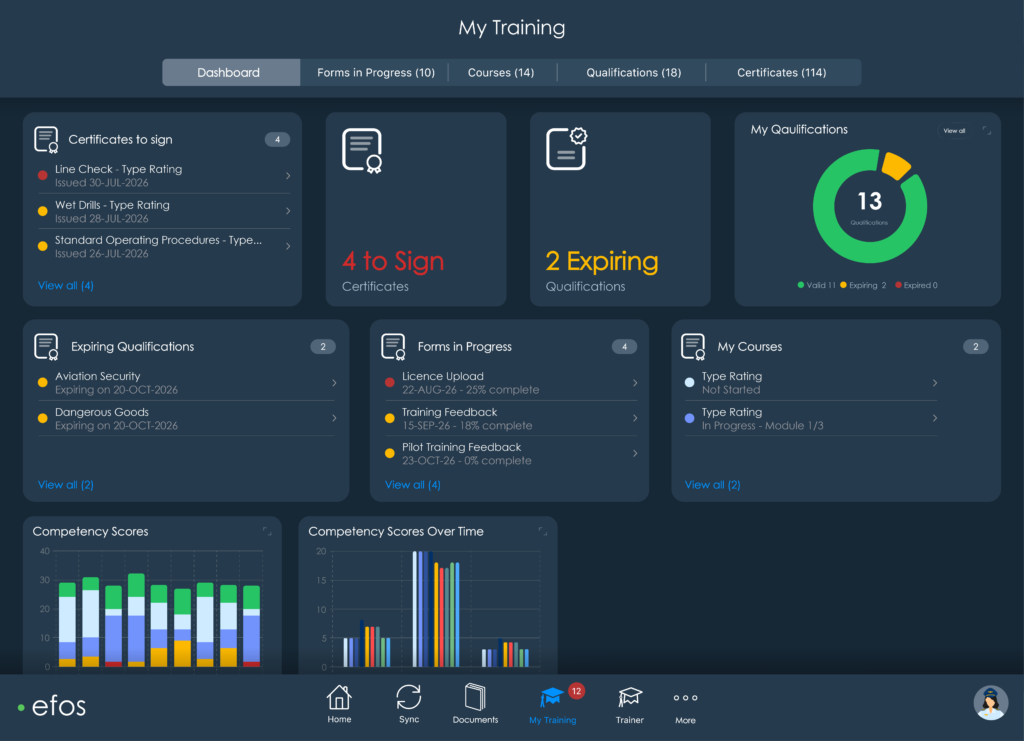
Those areas also have their own dedicated tabs within My Training, making it easier to move between what you need to do, what’s underway and what you’ve already achieved.
There’s room to make the dashboard your own, too. Alongside the seven standard cards, bespoke reports can be added to give your organisation quick access to the data that matters most to you.
Qualification reporting goes mobile
Qualifications Reporting has broken free from the desktop. Previously available on EFOS Web, trainers can now get the same valuable view of their candidates’ qualifications straight from the iPad.
Quickly see what’s current, what’s coming up and where attention is needed, with the freedom to filter by qualification status or role and dive into the detail and history when something needs a closer look.
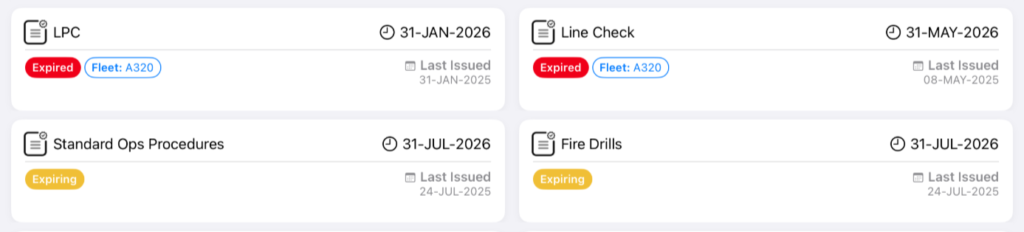
Whether you’re delivering training or simply away from your desk, the information you need to stay up to date with your candidates can now come with you.
Smarter forms, simpler workflows
Our Next Generation Forms continue to get smarter.
From standalone forms to intelligent automation, the latest enhancements give you more ways to build forms around the way your teams actually work, while cutting down on unnecessary input along the way.
- Standalone forms: Create and submit forms independently of a course, giving users greater flexibility.
- Smarter automation: Reduce manual input with calculated fields, automatic title updates and intelligent form behaviour.
- Dynamic forms: Show or hide sections based on responses, keeping forms relevant and easy to complete.
- Enhanced validation: Built-in rules help improve accuracy and ensure the right information is captured every time.
A familiar EFOS, wherever you use it
You might have noticed something else looking a little different.
We’re continuing to bring EFOS Web, Mobile, and iPad closer together with a cleaner, more consistent design language across the platform. Familiar card-based layouts, clearer navigation and a more cohesive experience mean there’s less to relearn when you move from one device to another.
It’s all part of making EFOS feel like one connected platform, whether it’s in your pocket, on your iPad or open at your desk.
And there's more to come
The new iPad dashboard might be the star of this release, but plenty of smaller improvements are working away in the background too. They all have the same goal: making your day in EFOS that little bit easier. And with your feedback continuing to shape the platform, there’s plenty more still to come. EFOS users can visit our Help Centre for the full release notes. Or, keep an eye on our latest news for everything coming next.
Not using EFOS yet? Book a demo today.


